Generating Text-Fabric Knowledge Graphs
This repository contains the following Jupyter Notebooks that can be used to create a JSON and/or an interactive visual representation of a Knowledge Graph representing a Text-Fabric dataset.
- create knowledge graph.ipynb: The basic notebook to generate the JSON Knowledge Graph.
- generate_cytoscape_html.ipynb: This notebook adds x-y positions to the nodes and generates an interactive HTML file (cytoscape based).
Diagram
This repository generates a knowledge graph from the Text-Fabric N1904 dataset with two main outputs. The general process is as follows:
flowchart TD
TF[Text-Fabric Dataset]
--> NB1[create_knowledge_graph.ipynb]
--> JSON[n1904_knowledge_graph.json + elements.json]
--> NB2[generate_cytoscape_html.ipynb]
--> HTML[Interactive HTML Graph]
--> Human[Interactive Visualization]
NB2 --> POS[node_positions.json]
JSON -.-> GPT[Custom GPT Grounding]
click NB1 "https://github.com/tonyjurg/TF_Knowledge_Graph/blob/main/create_knowledge_graph.ipynb" "Open notebook: create_knowledge_graph.ipynb"
click NB2 "https://github.com/tonyjurg/TF_Knowledge_Graph/blob/main/generate_cytoscape_html.ipynb" "Open notebook: generate_cytoscape_html.ipynb"
click JSON "https://tonyjurg.github.io/TF_Knowledge_Graph/n1904_knowledge_graph.json" "Open JSON output"
click HTML "https://tonyjurg.github.io/TF_Knowledge_Graph/n1904_graph_contextmenu.html" "Open interactive HTML graph"
click POS "https://tonyjurg.github.io/TF_Knowledge_Graph/node_positions.json" "Open node positions JSON"
click TF "https://centerblc.github.io/N1904/" "Open Text-Fabric N1904 dataset"
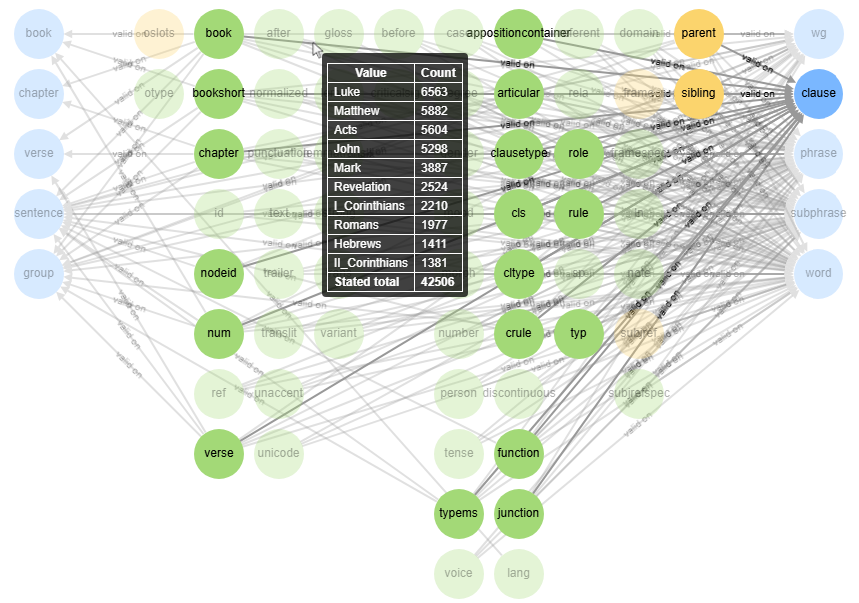
The end result
The following screenshot shows the generated visual presentation of the Knowledge Graph for the N1904-TF dataset. Click on the image to open the interactive view.